タブで切り替え可能なコードブロックとは?
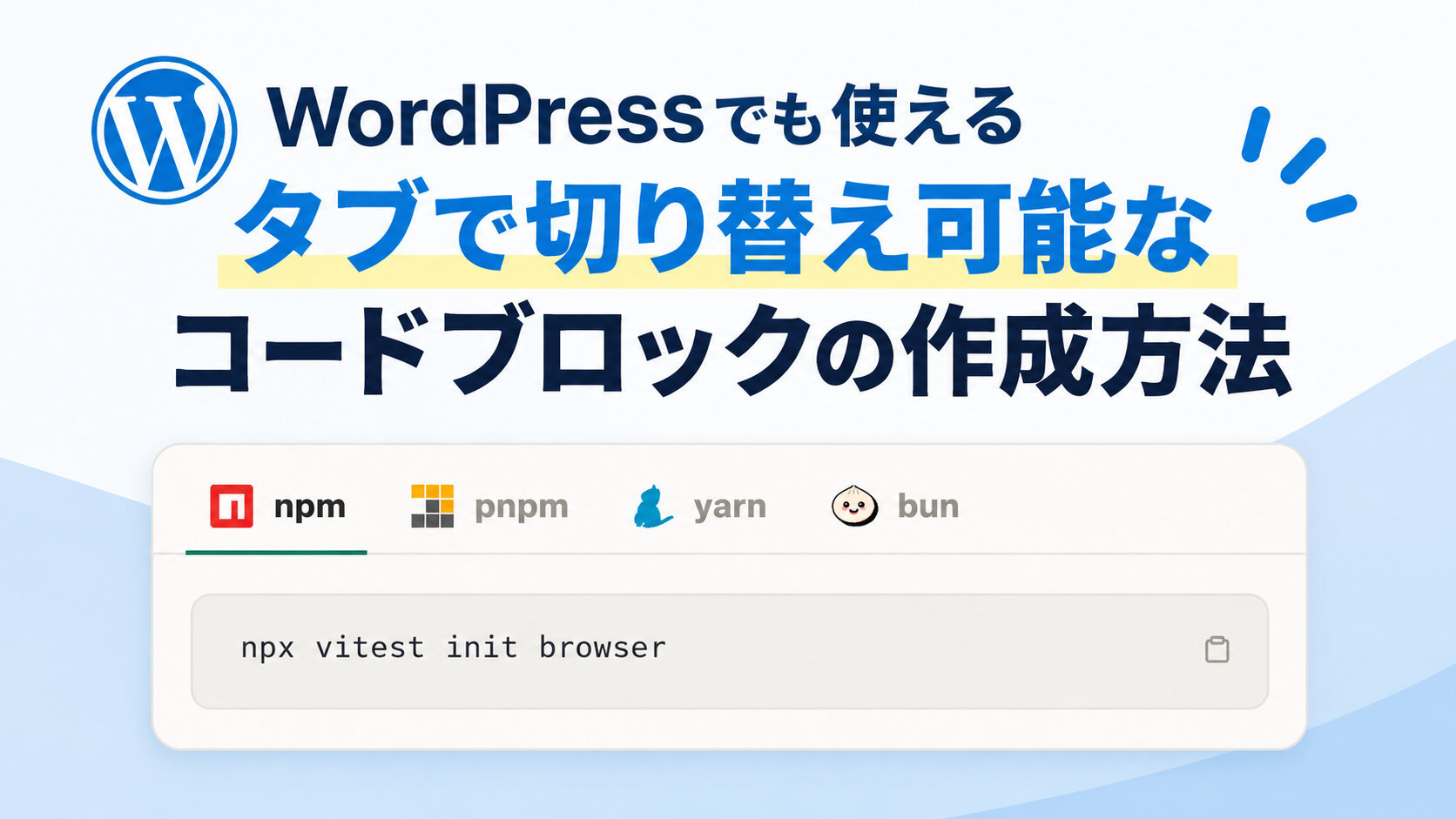
答え: これのこと👇️
最近、iwb.jp (WordPress) でnpmやpnpmのコマンドを記載することがあるのですが、このようなコードブロックがないと複数行に分けて記載しなければならず、コード部分が見づらくなってしまうのでタブで切り替え可能なコードブロックを自作しました。
HTML、CSS、JavaScriptだけで作成したシンプルな作りなので、すべての環境で使用可能です。
タブで切り替え可能なコードブロックの作り方
まず元となるHTMLとCSSを以下のようにコーディングします。
HTML
<div class="iwb-switcher">
  <div class="switcher">
    <input type="radio" name="tab-radio" id="tab-npm" checked>
    <input type="radio" name="tab-radio" id="tab-pnpm">
    <input type="radio" name="tab-radio" id="tab-yarn">
    <input type="radio" name="tab-radio" id="tab-bun">
    <div class="tabs">
      <label for="tab-npm">
        <svg viewBox="0 0 24 24" xmlns="http://www.w3.org/2000/svg"><path fill="#CB3837" d="M1.763 0C.786 0 0 .786 0 1.763v20.474C0 23.214.786 24 1.763 24h20.474c.977 0 1.763-.786 1.763-1.763V1.763C24 .786 23.214 0 22.237 0zM5.13 5.323l13.837.019-.009 13.836h-3.464l.01-10.382h-3.456L12.04 19.17H5.113z"/></svg>
        <span class="label-text">npm</span>
      </label>
      <label for="tab-pnpm">
        <svg viewBox="0 0 24 24" xmlns="http://www.w3.org/2000/svg">
          <rect x="0" y="0" width="7.5" height="7.5" fill="#F9AD00"/>
          <rect x="8.25" y="0" width="7.498" height="7.5" fill="#F9AD00"/>
          <rect x="16.5" y="0" width="7.5" height="7.5" fill="#F9AD00"/>
          <rect x="16.5" y="8.25" width="7.5" height="7.5" fill="#F9AD00"/>
          <rect x="8.25" y="8.25" width="7.498" height="7.5" fill="#4E4E4E"/>
          <rect x="0" y="16.5" width="7.5" height="7.5" fill="#4E4E4E"/>
          <rect x="8.25" y="16.5" width="7.498" height="7.5" fill="#4E4E4E"/>
          <rect x="16.5" y="16.5" width="7.5" height="7.5" fill="#4E4E4E"/>
        </svg>
        <span class="label-text">pnpm</span>
      </label>
      <label for="tab-yarn">
        <svg viewBox="0 0 288.6 310.4" xmlns="http://www.w3.org/2000/svg" style="width:16.7px;height:18px"><path fill="#2C8EBB" d="M279.7 248.5c-16 3.8-24.1 7.3-43.9 20.2-31 20-64.8 29.3-64.8 29.3s-2.8 4.2-10.9 6.1c-14 3.4-66.7 6.3-71.5 6.4-12.9.1-20.8-3.3-23-8.6-6.7-16 9.6-23 9.6-23s-3.6-2.2-5.7-4.2c-1.9-1.9-3.9-5.7-4.5-4.3-2.5 6.1-3.8 21-10.5 27.7-9.2 9.3-26.6 6.2-36.9.8-11.3-6 .8-20.1.8-20.1s-6.1 3.6-11-3.8C3 268.2-1.1 256.6 0 242.3 1.4 225.8 19.6 210 19.6 210s-3.2-24.1 7.3-48.8c9.5-22.5 35.1-40.6 35.1-40.6S40.5 96.9 48.5 75.4c5.2-14 7.3-13.9 9-14.5 6-2.3 11.8-4.8 16.1-9.5 21.5-23.2 48.9-18.8 48.9-18.8S135.3-6.7 147.3 1c3.7 2.4 17 32 17 32s14.2-8.3 15.8-5.2c8.6 16.7 9.6 48.6 5.8 68-6.4 32-22.4 49.2-28.8 60-1.5 2.5 17.2 10.4 29 43.1 10.9 29.9 1.2 55 2.9 57.8.3.5.4.7.4.7s12.5 1 37.6-14.5c13.4-8.3 29.3-17.6 47.4-17.8 17.5-.3 18.4 20.3 5.3 23.4z"/></svg>
        <span class="label-text">yarn</span>
      </label>
      <label for="tab-bun">
        <svg viewBox="0 0 80 70" xmlns="http://www.w3.org/2000/svg" style="width:20px;height:17.5px"><title>Bun Logo</title><path id="Shadow" d="M71.09,20.74c-.16-.17-.33-.34-.5-.5s-.33-.34-.5-.5-.33-.34-.5-.5-.33-.34-.5-.5-.33-.34-.5-.5-.33-.34-.5-.5-.33-.34-.5-.5A26.46,26.46,0,0,1,75.5,35.7c0,16.57-16.82,30.05-37.5,30.05-11.58,0-21.94-4.23-28.83-10.86l.5.5.5.5.5.5.5.5.5.5.5.5.5.5C19.55,65.3,30.14,69.75,42,69.75c20.68,0,37.5-13.48,37.5-30C79.5,32.69,76.46,26,71.09,20.74Z"/><g id="Body"><path id="Background" d="M73,35.7c0,15.21-15.67,27.54-35,27.54S3,50.91,3,35.7C3,26.27,9,17.94,18.22,13S33.18,3,38,3s8.94,4.13,19.78,10C67,17.94,73,26.27,73,35.7Z" style="fill:#fbf0df"/><path id="Bottom_Shadow" d="M73,35.7a21.67,21.67,0,0,0-.8-5.78c-2.73,33.3-43.35,34.9-59.32,24.94A40,40,0,0,0,38,63.24C57.3,63.24,73,50.89,73,35.7Z" style="fill:#f6dece"/><path id="Light_Shine" d="M24.53,11.17C29,8.49,34.94,3.46,40.78,3.45A9.29,9.29,0,0,0,38,3c-2.42,0-5,1.25-8.25,3.13-1.13.66-2.3,1.39-3.54,2.15-2.33,1.44-5,3.07-8,4.7C8.69,18.13,3,26.62,3,35.7c0,.4,0,.8,0,1.19C9.06,15.48,20.07,13.85,24.53,11.17Z" style="fill:#fffefc"/><path id="Top" d="M35.12,5.53A16.41,16.41,0,0,1,29.49,18c-.28.25-.06.73.3.59,3.37-1.31,7.92-5.23,6-13.14C35.71,5,35.12,5.12,35.12,5.53Zm2.27,0A16.24,16.24,0,0,1,39,19c-.12.35.31.65.55.36C41.74,16.56,43.65,11,37.93,5,37.64,4.74,37.19,5.14,37.39,5.49Zm2.76-.17A16.42,16.42,0,0,1,47,17.12a.33.33,0,0,0,.65.11c.92-3.49.4-9.44-7.17-12.53C40.08,4.54,39.82,5.08,40.15,5.32ZM21.69,15.76a16.94,16.94,0,0,0,10.47-9c.18-.36.75-.22.66.18-1.73,8-7.52,9.67-11.12,9.45C21.32,16.4,21.33,15.87,21.69,15.76Z" style="fill:#ccbea7;fill-rule:evenodd"/><path id="Outline" d="M38,65.75C17.32,65.75.5,52.27.5,35.7c0-10,6.18-19.33,16.53-24.92,3-1.6,5.57-3.21,7.86-4.62,1.26-.78,2.45-1.51,3.6-2.19C32,1.89,35,.5,38,.5s5.62,1.2,8.9,3.14c1,.57,2,1.19,3.07,1.87,2.49,1.54,5.3,3.28,9,5.27C69.32,16.37,75.5,25.69,75.5,35.7,75.5,52.27,58.68,65.75,38,65.75ZM38,3c-2.42,0-5,1.25-8.25,3.13-1.13.66-2.3,1.39-3.54,2.15-2.33,1.44-5,3.07-8,4.7C8.69,18.13,3,26.62,3,35.7,3,50.89,18.7,63.25,38,63.25S73,50.89,73,35.7C73,26.62,67.31,18.13,57.78,13,54,11,51.05,9.12,48.66,7.64c-1.09-.67-2.09-1.29-3-1.84C42.63,4,40.42,3,38,3Z"/></g><g id="Mouth"><g id="Background-2"><path d="M45.05,43a8.93,8.93,0,0,1-2.92,4.71,6.81,6.81,0,0,1-4,1.88A6.84,6.84,0,0,1,34,47.71,8.93,8.93,0,0,1,31.12,43a.72.72,0,0,1,.8-.81H44.26A.72.72,0,0,1,45.05,43Z" style="fill:#b71422"/></g><g id="Tongue"><path id="Background-3" d="M34,47.79a6.91,6.91,0,0,0,4.12,1.9,6.91,6.91,0,0,0,4.11-1.9,10.63,10.63,0,0,0,1-1.07,6.83,6.83,0,0,0-4.9-2.31,6.15,6.15,0,0,0-5,2.78C33.56,47.4,33.76,47.6,34,47.79Z" style="fill:#ff6164"/><path id="Outline-2" d="M34.16,47a5.36,5.36,0,0,1,4.19-2.08,6,6,0,0,1,4,1.69c.23-.25.45-.51.66-.77a7,7,0,0,0-4.71-1.93,6.36,6.36,0,0,0-4.89,2.36A9.53,9.53,0,0,0,34.16,47Z"/></g><path id="Outline-3" d="M38.09,50.19a7.42,7.42,0,0,1-4.45-2,9.52,9.52,0,0,1-3.11-5.05,1.2,1.2,0,0,1,.26-1,1.41,1.41,0,0,1,1.13-.51H44.26a1.44,1.44,0,0,1,1.13.51,1.19,1.19,0,0,1,.25,1h0a9.52,9.52,0,0,1-3.11,5.05A7.42,7.42,0,0,1,38.09,50.19Zm-6.17-7.4c-.16,0-.2.07-.21.09a8.29,8.29,0,0,0,2.73,4.37A6.23,6.23,0,0,0,38.09,49a6.28,6.28,0,0,0,3.65-1.73,8.3,8.3,0,0,0,2.72-4.37.21.21,0,0,0-.2-.09Z"/></g><g id="Face"><ellipse id="Right_Blush" cx="53.22" cy="40.18" rx="5.85" ry="3.44" style="fill:#febbd0"/><ellipse id="Left_Bluch" cx="22.95" cy="40.18" rx="5.85" ry="3.44" style="fill:#febbd0"/><path id="Eyes" d="M25.7,38.8a5.51,5.51,0,1,0-5.5-5.51A5.51,5.51,0,0,0,25.7,38.8Zm24.77,0A5.51,5.51,0,1,0,45,33.29,5.5,5.5,0,0,0,50.47,38.8Z" style="fill-rule:evenodd"/><path id="Iris" d="M24,33.64a2.07,2.07,0,1,0-2.06-2.07A2.07,2.07,0,0,0,24,33.64Zm24.77,0a2.07,2.07,0,1,0-2.06-2.07A2.07,2.07,0,0,0,48.75,33.64Z" style="fill:#fff;fill-rule:evenodd"/></g></svg>
        <span class="label-text">bun</span>
      </label>
    </div>
    <div class="panels">
      <div class="panel npm">
        <div class="panel-inner">
          <div class="cmd"><span class="cmd-text"></span></div>
          <button class="copy-btn" aria-label="コマンドをコピー">
            <span class="toast">コピーしました。</span>
            <svg class="icon-clipboard" viewBox="0 0 24 24" fill="none" stroke="currentColor" stroke-width="1.8" stroke-linecap="round" stroke-linejoin="round"><rect x="8" y="4" width="8" height="4" rx="1"></rect><path d="M8 6H6a1 1 0 0 0-1 1v12a1 1 0 0 0 1 1h12a1 1 0 0 0 1-1V7a1 1 0 0 0-1-1h-2"></path></svg>
            <svg class="icon-check" viewBox="0 0 24 24" fill="none" stroke="currentColor" stroke-width="2" stroke-linecap="round" stroke-linejoin="round"><path d="M4 12l5 5L20 6"></path></svg>
          </button>
        </div>
      </div>
      <div class="panel pnpm">
        <div class="panel-inner">
          <div class="cmd"><span class="cmd-text"></span></div>
          <button class="copy-btn" aria-label="コマンドをコピー">
            <span class="toast">コピーしました。</span>
            <svg class="icon-clipboard" viewBox="0 0 24 24" fill="none" stroke="currentColor" stroke-width="1.8" stroke-linecap="round" stroke-linejoin="round"><rect x="8" y="4" width="8" height="4" rx="1"></rect><path d="M8 6H6a1 1 0 0 0-1 1v12a1 1 0 0 0 1 1h12a1 1 0 0 0 1-1V7a1 1 0 0 0-1-1h-2"></path></svg>
            <svg class="icon-check" viewBox="0 0 24 24" fill="none" stroke="currentColor" stroke-width="2" stroke-linecap="round" stroke-linejoin="round"><path d="M4 12l5 5L20 6"></path></svg>
          </button>
        </div>
      </div>
      <div class="panel yarn">
        <div class="panel-inner">
          <div class="cmd"><span class="cmd-text"></span></div>
          <button class="copy-btn" aria-label="コマンドをコピー">
            <span class="toast">コピーしました。</span>
            <svg class="icon-clipboard" viewBox="0 0 24 24" fill="none" stroke="currentColor" stroke-width="1.8" stroke-linecap="round" stroke-linejoin="round"><rect x="8" y="4" width="8" height="4" rx="1"></rect><path d="M8 6H6a1 1 0 0 0-1 1v12a1 1 0 0 0 1 1h12a1 1 0 0 0 1-1V7a1 1 0 0 0-1-1h-2"></path></svg>
            <svg class="icon-check" viewBox="0 0 24 24" fill="none" stroke="currentColor" stroke-width="2" stroke-linecap="round" stroke-linejoin="round"><path d="M4 12l5 5L20 6"></path></svg>
          </button>
        </div>
      </div>
      <div class="panel bun">
        <div class="panel-inner">
          <div class="cmd"><span class="cmd-text"></span></div>
          <button class="copy-btn" aria-label="コマンドをコピー">
            <span class="toast">コピーしました。</span>
            <svg class="icon-clipboard" viewBox="0 0 24 24" fill="none" stroke="currentColor" stroke-width="1.8" stroke-linecap="round" stroke-linejoin="round"><rect x="8" y="4" width="8" height="4" rx="1"></rect><path d="M8 6H6a1 1 0 0 0-1 1v12a1 1 0 0 0 1 1h12a1 1 0 0 0 1-1V7a1 1 0 0 0-1-1h-2"></path></svg>
            <svg class="icon-check" viewBox="0 0 24 24" fill="none" stroke="currentColor" stroke-width="2" stroke-linecap="round" stroke-linejoin="round"><path d="M4 12l5 5L20 6"></path></svg>
          </button>
        </div>
      </div>
    </div>
  </div>
</div>CSS
@scope (.iwb-switcher) {
  :scope {
    --bg: #f6f5f3;
    --panel: #fbfaf8;
    --ink: #1c1b19;
    --gray: #8a8579;
    --line: #e4e1da;
    --accent: #2f6f4f;
    --mono: 'SFMono-Regular', Consolas, 'Liberation Mono', Menlo, monospace;

    width: 100%;
    max-width: 560px;
    background: var(--panel);
    border: 1px solid var(--line);
    border-radius: 14px;
    overflow: hidden;
    box-shadow: 0 1px 2px rgba(28,27,25,0.04);
    font-family: -apple-system, BlinkMacSystemFont, 'Hiragino Sans', 'Noto Sans JP', sans-serif;
  }

  * { box-sizing: border-box; }

  .cmd {
    background-color: initial;
  }

  .switcher { position: relative; }

  .switcher input[type="radio"] {
    position: absolute;
    opacity: 0;
    pointer-events: none;
  }

  .tabs {
    display: flex;
    align-items: center;
    gap: 4px;
    padding: 10px 14px 0;
    border-bottom: 1px solid var(--line);
  }

  .tabs label {
    display: flex;
    align-items: center;
    gap: 8px;
    padding: 10px 12px;
    font-size: 14.5px;
    color: var(--gray);
    cursor: pointer;
    border-bottom: 2px solid transparent;
    margin-bottom: -1px;
    user-select: none;
    transition: color 0.15s ease;
    white-space: nowrap;
  }

  .tabs label:is(:hover, :focus) { color: var(--ink); }
  .tabs label svg { width: 18px; height: 18px; flex-shrink: 0; display: block; }
  .panels { position: relative; }
  .panel { display: none; padding: 20px 18px 22px; }
  .panel-inner {
    position: relative;
    display: flex;
    align-items: center;
    justify-content: space-between;
    gap: 12px;
    background: #f1efe9;
    border: 1px solid var(--line);
    border-radius: 10px;
    padding: 12px 8px 12px 16px;
  }

  .cmd {
    font-family: var(--mono);
    font-size: 14.5px;
    line-height: 1.5;
    color: var(--ink);
    overflow-x: auto;
    white-space: pre;
  }

  .copy-btn {
    position: relative;
    flex-shrink: 0;
    display: flex;
    align-items: center;
    justify-content: center;
    width: 34px;
    height: 34px;
    padding: 0;
    border: none;
    background: transparent;
    border-radius: 8px;
    cursor: pointer;
    color: var(--gray);
    transition: background 0.15s ease, color 0.15s ease;
  }
  .copy-btn:focus { background: none; }
  .copy-btn:hover { background: #ebe4d2; }
  .copy-btn svg { width: 17px; height: 17px; pointer-events: none; }
  .copy-btn .icon-check { display: none; color: var(--accent); }
  .copy-btn.copied .icon-clipboard { display: none; }
  .copy-btn.copied .icon-check { display: block; }

  .toast {
    position: absolute;
    bottom: calc(100% + 8px);
    right: 0;
    background: var(--ink);
    color: #fff;
    font-size: 12px;
    line-height: 1;
    padding: 6px 10px;
    border-radius: 6px;
    white-space: nowrap;
    opacity: 0;
    transform: translateY(4px);
    transition: opacity 0.15s ease, transform 0.15s ease;
    pointer-events: none;
  }

  .toast::after {
    content: '';
    position: absolute;
    top: 100%;
    right: 12px;
    border: 5px solid transparent;
    border-top-color: var(--ink);
  }

  .toast.show {
    opacity: 1;
    transform: translateY(0);
  }

  #tab-npm:checked  ~ .tabs label[for="tab-npm"],
  #tab-yarn:checked ~ .tabs label[for="tab-yarn"],
  #tab-pnpm:checked ~ .tabs label[for="tab-pnpm"],
  #tab-bun:checked  ~ .tabs label[for="tab-bun"] {
    color: var(--ink);
    border-bottom-color: var(--accent);
  }

  #tab-npm:checked  ~ .panels .panel.npm,
  #tab-yarn:checked ~ .panels .panel.yarn,
  #tab-pnpm:checked ~ .panels .panel.pnpm,
  #tab-bun:checked  ~ .panels .panel.bun {
    display: block;
  }

  @media (max-width: 480px) {
    .tabs { padding: 8px 8px 0; }
    .tabs label { padding: 10px 8px; font-size: 13px; }
    .tabs label span.label-text { display: none; }
  }
}CSSがほかのWebサイト内の既存のコードに影響を与えないように@scopeを使って適用範囲をスコープしています。
JavaScriptはコードの挿入とクリップボードへのコピーに使用しています。
JavaScript
document.addEventListener('DOMContentLoaded', () => {
  const commands = [
    `npx vitest init browser`,
    `pnpm dlx vitest init browser`,
    `yarn dlx vitest init browser`,
    `bunx vitest init browser`
  ]

  const fallbackCopy = (text) => {
    const textarea = document.createElement('textarea')
    textarea.value = text
    textarea.style.position = 'fixed'
    textarea.style.top = '-1000px'
    textarea.style.left = '-1000px'
    document.body.appendChild(textarea)
    textarea.focus()
    textarea.select()
    let ok = false
    try {
      ok = document.execCommand('copy')
    } catch {
      ok = false
    }
    document.body.removeChild(textarea)
    return ok
  }

  const copyText = async (text) => {
    if (navigator.clipboard && window.isSecureContext) {
      try {
        await navigator.clipboard.writeText(text)
        return true
      } catch {
        return fallbackCopy(text)
      }
    }
    return fallbackCopy(text)
  }

  const panels = document.querySelectorAll('.iwb-switcher .panel')
  panels.forEach((panel, index) => {
    const cmdText = commands[index]
    if (!cmdText) return

    const cmdTextEl = panel.querySelector('.cmd-text')
    const btn = panel.querySelector('.copy-btn')

    if (cmdTextEl) {
      cmdTextEl.textContent = cmdText
    }
    if (btn) {
      btn.setAttribute('data-cmd', cmdText)
      btn.addEventListener('click', async () => {
        const text = btn.getAttribute('data-cmd')
        const toast = btn.querySelector('.toast')
        const success = await copyText(text)

        if (success) {
          btn.classList.add('copied')
          toast?.classList.add('show')
          setTimeout(() => {
            btn.classList.remove('copied')
            toast?.classList.remove('show')
          }, 1500)
        }
      })
    }
  })
})WordPressの場合は以上のHTML、CSS、JavaScriptを「カスタムHTML」で挿入するだけで実装できます。
表示するコードは配列にテンプレートリテラルを入れているので、${foo} で変数を入れたり、改行コードの挿入による改行も容易にできます。
JavaScript
const commands = [
  `npx vitest init browser`,
  `pnpm dlx vitest init browser`,
  `yarn dlx vitest init browser`,
  `bunx vitest init browser`
]※ 画面内に複数のコードブロックを配置する場合は、別の名前のものを作成するかforEachを使うなどの対応が必要
まとめ
記事のタブ切り替えコードブロックはWordPressプラグインやライブラリなどを使用していないので、基本的にアップデートの必要がなく、自由にカスタマイズできます。
HTML、CSS、JavaScriptの知識があれば自由な形で作れるので、タブ切り替えのコードブロックはこちらのコードを参考にして作成することをおすすめします。